
The Conditional Content feature supports custom conditions that can be defined by other plugins or child themes. This allows developers to extend the available logic beyond the built-in options by registering their own evaluation methods.
Options
When selecting the condition type in the Conditional Content settings, the following options are available:
- Default (
greyd_conditional_content_filter) – Uses the built-in default filter hook for evaluating the condition. - Select Custom Condition – Choose an existing custom condition provided by a plugin, theme, or via JavaScript hook. There will be a separate entry for each custom condition added with JavaScript or PHP.
- Individual – Allows manual entry of a custom filter name.
If Individual is selected, a text input field will appear where you can provide the name of the filter to be used for evaluation.
Adding Conditions via JavaScript
You can use the JavaScript hook greyd.conditional-content.conditions to register additional custom conditions for the selection dropdown. The JavaScript file has to be enqueued with the enqueue_block_editor_assets action.
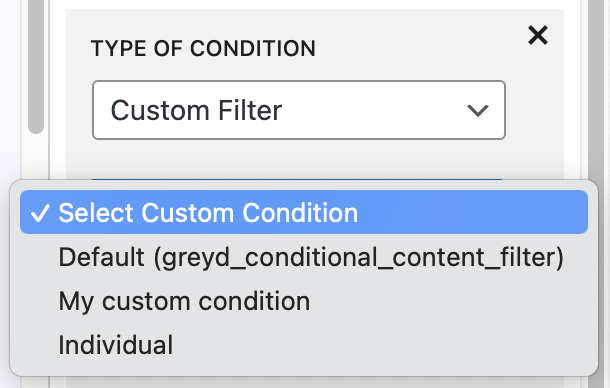
Example – Adding conditions via JavaScript:
/**
 * Block Editor script.
 */
( function ( wp ) {

	/**
	 * custom conditional content condition
	 */
	wp.hooks.addFilter(
		'greyd.conditional-content.conditions',
		'my_custom_condition_filter_name',
		function( conditions ) {
			conditions.push( { value: 'my_custom_condition_filter_name', label: "My custom condition" } );
			return conditions;
		}
	);

} )( window.wp );
Condition Types
Custom conditions can use any of the following operators when evaluating the value returned by the filter:
- Has the value
- Has not the value
- Contains the value
- Does not contain the value
- Is set
- Is not set
Value Input Rules
For Is set and Is not set, no additional value input is required.
For all other operators, a Value of the Filter text input is shown for entering the comparison value.
Default Evaluation Behavior
By default, a selected Custom Filter evaluates to empty / not set. To return and evaluate a different value, the filter must be implemented in the PHP code of your custom plugin or child theme.
Defining the Filter in PHP
When defining the filter in PHP, return a value based on your custom logic so it can be evaluated against the selected operator.
Example – Implementing a custom filter in PHP:
/**
 * custom conditional content condition
 *
 * @param null|bool $is_active  The current state of the condition (NULL, true, false)
 * @param array     $args       The arguments passed to the condition
 *      @var string $type       The type of condition, should be 'custom' in this case.
 *      @var string $operator   The operator of the condition (is, is_not, has, has_not, not_empty, empty)
 *      @var string $value      The value of the condition inserted by the editor.
 *      @var string $detail     The detail of the condition.
 *      @var array  $custom     The custom arguments of the condition, usually empty.
 * @return null|bool            The new state of the condition
 */
function render_my_custom_condition( $is_active, $args ) {

	// check the condition
	if ( current_user_can( 'administrator' ) ) {
		return true;
	}

	return false;
}
add_filter( 'my_custom_condition_filter_name', 'render_my_custom_condition', 10, 2 );
Notes
If no explicit filter name is provided (either via the JavaScript hook or entered in the text input), the default filter greyd_conditional_content_filter is used. In this case, use the $args parameter of the filter to determine the return value.