
When using the Global Content feature to share and synchronize content across multiple websites, canonical URLs play an important role in preventing duplicate content issues. This article explains how canonical URLs are automatically managed by the plugin, how they interact with SEO plugins, and how developers can optionally replace permalinks with canonical URLs using a configuration constant.
Functionality
Global Content allows you to create content once on a master site and reuse it across multiple target sites. This results in multiple pages showing identical or near-identical content under different URLs. To help search engines understand which version should be treated as the original, a canonical URL is included in the <head> of each page using synchronized content. This tag points to the original source of the content.
The canonical tag is only rendered on single post views. If an SEO plugin already outputs a canonical tag, the plugin defers to that and does not add its own markup.
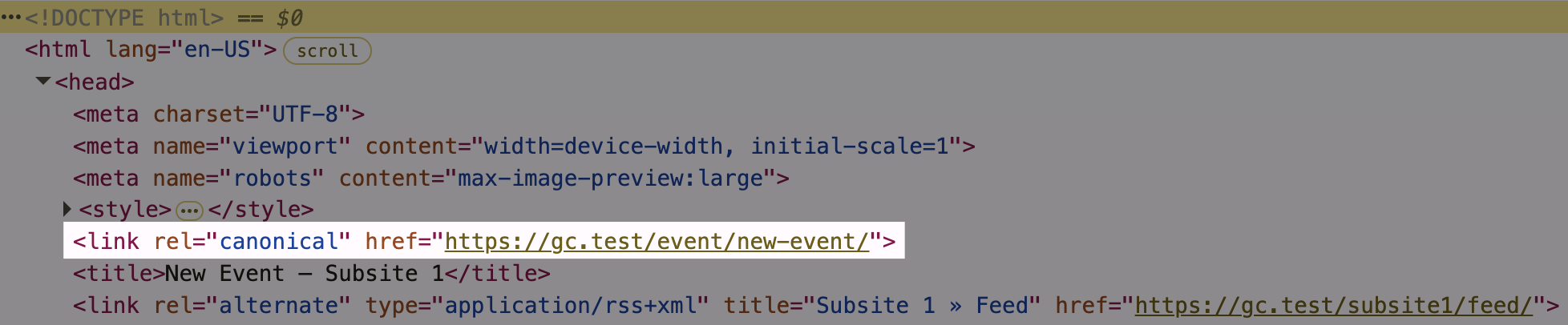
It’s also possible to edit the canonical link manually, see the Editing a root post documentation.
SEO Plugin Compatibility
The function is compatible with common SEO plugins and integrates via native filters. For Yoast SEO, the canonical URL is filtered using wpseo_canonical. For Rank Math, the plugin uses rank_math/frontend/canonical.
If either plugin has already set a canonical URL via post meta, the plugin does not add an additional one to the page. Instead, it modifies the value through the respective filters, ensuring compatibility and avoiding conflicts.
Using Canonical URLs as Permalinks
By default, the canonical URL is only included as a reference in the page’s <head> but does not affect how internal links behave. However, the plugin includes an optional mode that lets you use the canonical URL as the actual permalink. This is useful when you want users to land on the original version of a post instead of its synchronized copy.
To activate this mode, define the following constant in the wp-config.php file of the target site:
define( 'USE_CANONICAL_URL_AS_PERMALINK', true );Once enabled, the plugin filters WordPress permalink functions like post_link and post_type_link. All links to the affected post, such as from Query Loops or navigation elements, will then lead directly to the canonical URL.
For example, instead of linking to https://target-site.com/news/article-x/, a visitor clicking the post title or button will be taken to https://master-site.com/news/article-x/.
Use Case
This option is especially useful if you manage content centrally but want to direct users to another destination. For instance, a post can be managed on the master site, but all frontend links can point to:
- an external website where the content is published,
- a dedicated market-specific subsite in a multisite setup, or
- a separate landing page optimized for a specific campaign.
While the content stays synchronized, the user journey can be adjusted as needed.