
The Hidden field block in Greyd Forms allows you to transmit values invisibly through a form. These values are not displayed in the frontend but can be used for backend processing or integrations. This is especially useful for tracking data like campaign parameters or quiz results.

Settings
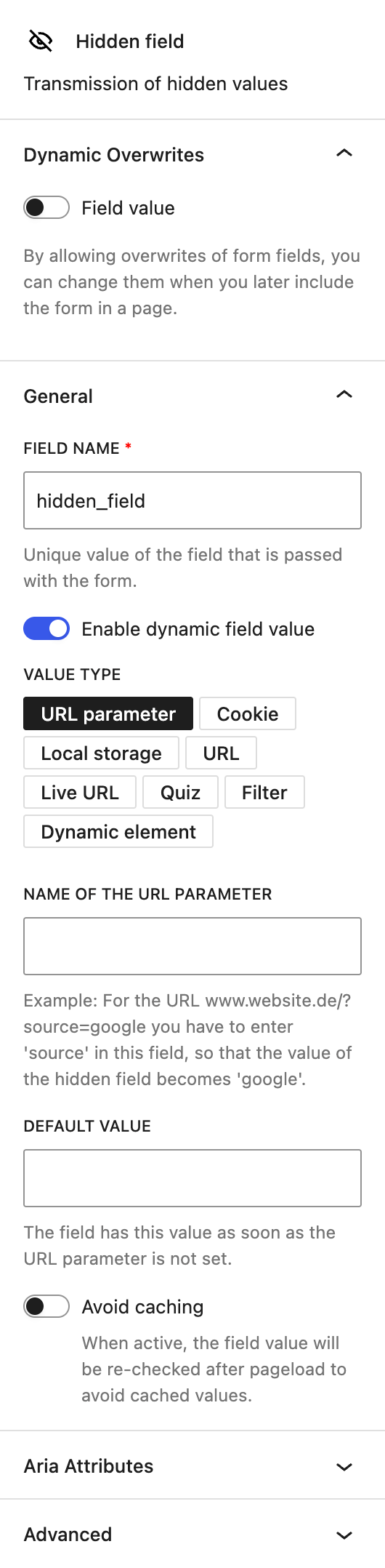
The block includes a separate Dynamic Overwrites section, which lets you mark the field value as dynamic so it can be overwritten when the form is embedded using the Dynamic form block. This is independent of the Dynamic field value option described below, which controls how the value is populated within the form itself. See the Dynamic Overwrites section for details.
In the General section, you can change the automatically prepopulated the field name that will be submitted with the form. Additionally, you can assign a fixed field value or make it dynamic using the Dynamic field value toggle. If the dynamic mode is enabled, several methods are available to populate the field automatically:
URL Parameter
This option allows the field to read a specific parameter from the URL. You must specify the URL parameter name.
Example: If the URL is example.com/?source=google, entering source will set the hidden field’s value to google.
You can define a fallback value using the Default value input, which will be used if the parameter is missing.
The setting Avoid caching ensures that the value is re-evaluated after each page load to prevent stale data from being submitted from cached versions.
Cookie
In this mode, the field pulls its value from a browser cookie. Provide the name of the cookie to be read.
As with the URL Parameter, you can add a Default value and enable Avoid caching to ensure accuracy after each load.
Local Storage
This mode pulls information from the browser’s local storage when provided the correct name of the local storage. You can also set a Default value.
URL
This mode stores the current base URL, stripped of parameters and hash fragments.
The Avoid caching toggle is also available here to force value re-checks on every load.
Live URL
This captures the complete current URL, including parameters and hashes. The value updates in real time as the URL changes.
Quiz
This mode saves the number of correct answers a user gave in a quiz.
Filter
For advanced customization, the value can be programmatically adjusted using the PHP filter:greyd_forms_hidden_field_value_{name}
Dynamic element
This mode fills the field using a Dynamic Tag selected from a dropdown, the same mechanism used elsewhere in the editor. By default, only basic tags are available, such as Post ID, Post Title, or Website title. Enabling Dynamic Overwrites for this field and inserting the form using the Dynamic form block unlocks the full set of Dynamic Tags, matching the context of the page or post where the form is actually embedded — the same way this works for a Dynamic Template. See the Dynamic Tags documentation for more details.
The block also supports Aria Attributes. In the Advanced section, you can add additional CSS classes.