
The SEO Extensions feature can be turned on or off individually on the Features page.
SEO sitemap
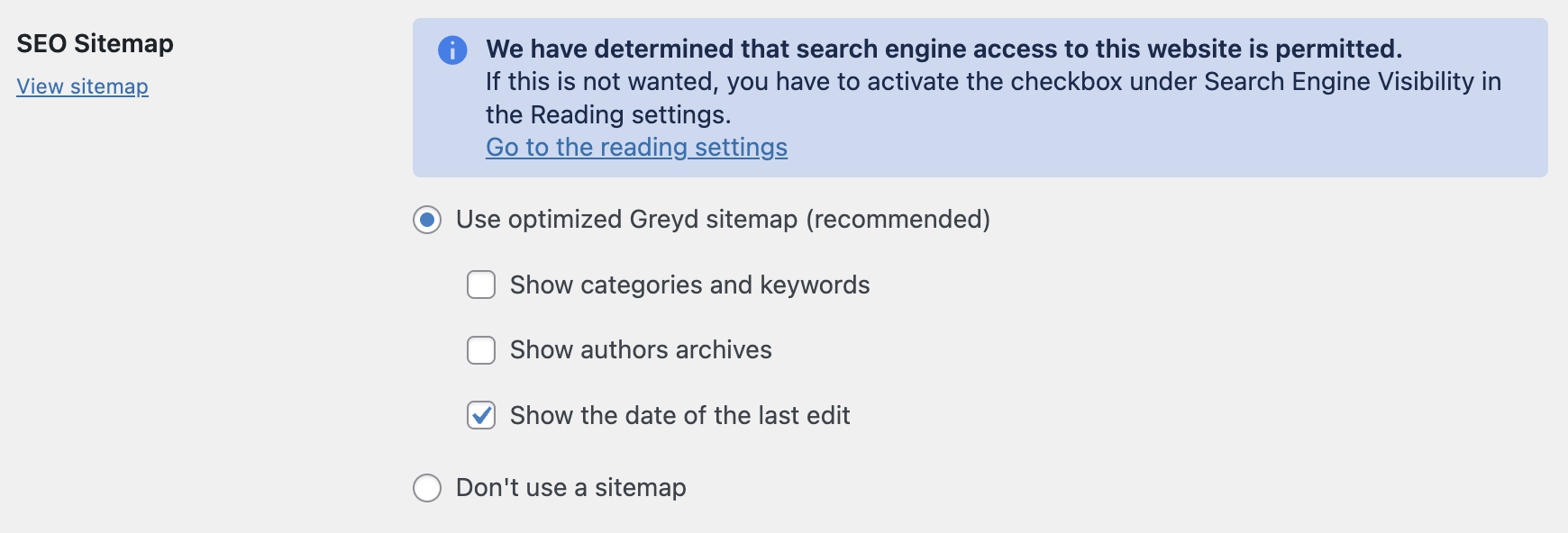
The Greyd Plugin includes native support for XML sitemaps, which can be managed under Greyd Suite Settings → SEO Sitemap. This feature allows you to control how search engines like Google discover and index your site’s content.
By default, WordPress generates a basic sitemap since version 5.5. However, with the Greyd Plugin, you can enable an optimized sitemap with just a few clicks.
There are two main options:
Use optimized Greyd sitemap (recommended):
This is the default and recommended option. It registers a sitemap for your website, making it easier for search engine bots to understand the structure and content of your site.
When enabled, you’ll see three optional settings:
- Show categories and keywords: Includes taxonomy archives such as categories and tags in the sitemap. This option is off by default.
- Show authors archives: Lists author archive pages in the sitemap. This option is also off by default.
- Show the date of the last edit: Adds the last modified date to each entry in the sitemap. Like the others, this is off by default and not required for a proper sitemap.
These additional options are not necessary for a basic, functional sitemap but can be enabled if needed.
Don’t use a sitemap:
This disables the sitemap functionality entirely. It may be useful if you prefer not to expose your site to search engines or if another plugin, such as a dedicated SEO tool, already handles sitemap generation.
Greyd also detects your site’s general visibility settings, configured in Settings → Reading. If your site is set to discourage search engines, you’ll see a red warning message in the SEO Sitemap section.
When using the Yoast SEO plugin, Greyd adapts accordingly. Instead of Greyd’s native sitemap options, you’ll see controls for integrating with the Yoast-generated sitemap.
- If you choose the “configured option”, the sitemap respects visibility settings defined in each post type. Only public content is included.
- Alternatively, you can manually manage sitemap visibility using Yoast’s own interface.
At the top of the settings section, there’s also a link to preview the sitemap. This opens the actual XML file, where you can review the content structure as seen by search engines.
Compatibility notes
The Greyd Plugin includes specific adjustments for two popular SEO plugins:
RankMath Compatibility:
The readability analysis in RankMath is extended to recognize and process custom attributes, such as those used in Dynamic Templates.
Canonical URL Support (Yoast & RankMath):
In combination with the Global Content feature, canonical URLs set in root posts are automatically synced to their child posts. If a canonical URL is defined using Yoast or RankMath, it will be used. If not, the default canonical logic from Greyd applies.